Comparing AWS EKS vs ECS: An In-Depth Overview

In modern application development, containerization has become an essential tool for managing and deploying applications. AWS offers two major container orchestration services – Amazon Elastic Kubernetes Service (EKS) and Amazon Elastic Container Service (ECS) – that help developers easily deploy, manage, and scale their containerized applications.

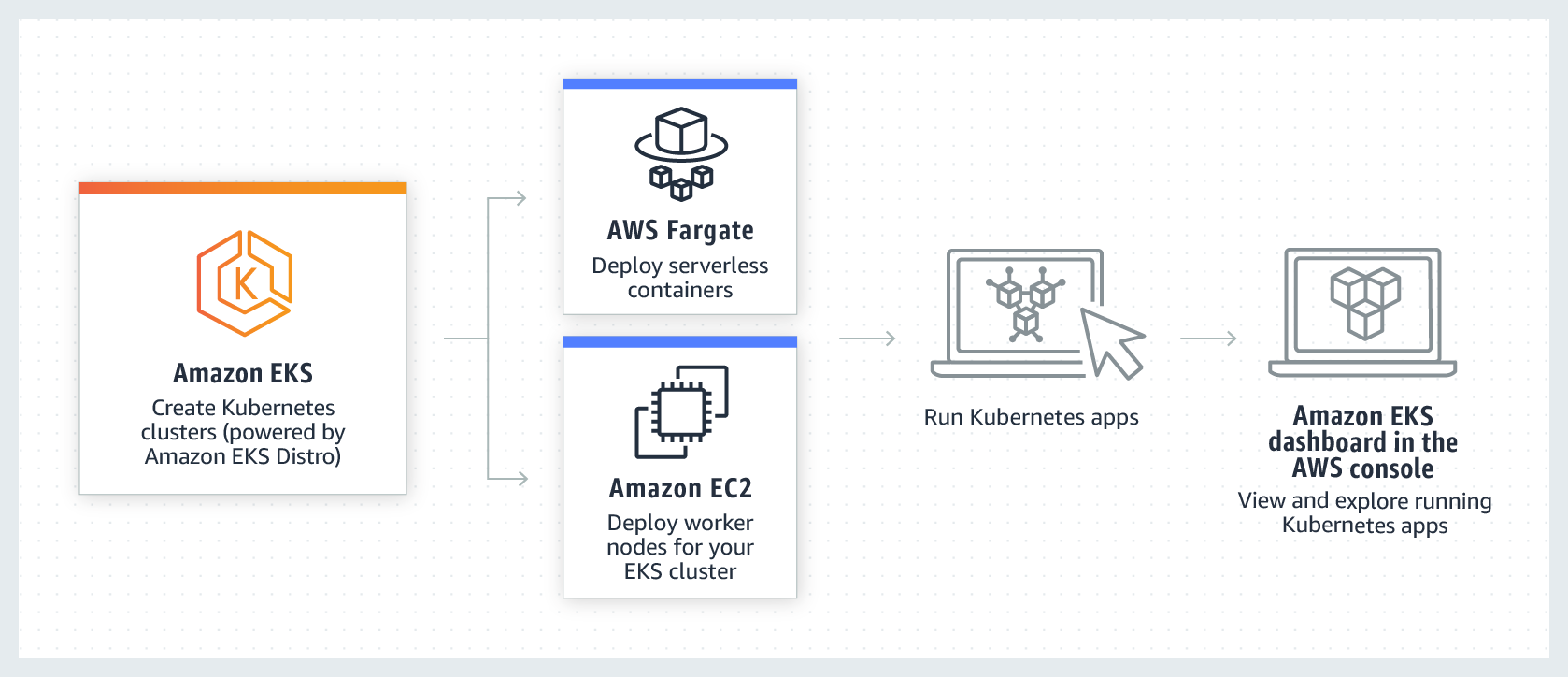
Amazon EKS is a managed Kubernetes service that allows developers to run Kubernetes clusters in the AWS cloud without the hassle of managing the underlying infrastructure. It helps developers focus on building and deploying their applications, while AWS takes care of the infrastructure and scaling needs.

Amazon ECS is a highly scalable, high-performance container orchestration service that supports both Docker containers and serverless containers. It offers seamless integration with other AWS services, making it easy for developers to build, deploy, and manage their applications in the cloud.

Understanding Container Orchestration

Container orchestration is the process of managing and automating the deployment, scaling, and management of containers within a cloud computing environment. It involves managing the lifecycle of containers, from creation and deployment to monitoring and scaling, in order to efficiently run and manage applications.

In cloud computing, container orchestration is essential for managing large and complex environments consisting of multiple containers and clusters. It allows organizations to easily deploy and manage applications across multiple servers, making it easier to scale and update applications as needed.

Some common features expected from a container orchestration platform include:

  1. Container deployment and scheduling: This involves the automatic deployment of containers across multiple hosts, as well as the scheduling of tasks to ensure efficient resource utilization.
  2. Scaling and load balancing: Container orchestration platforms have the ability to automatically scale containers based on demand, as well as distribute traffic across multiple containers to ensure optimal performance.
  3. Service discovery: This feature enables containers to communicate with each other, even as they are dynamically created and destroyed.
  4. High availability: Container orchestration platforms ensure high availability of applications by automatically restarting failed containers or moving them to different hosts.
  5. Logging and monitoring: These platforms provide tools for tracking and monitoring the performance of containers, as well as collecting and analyzing logs for troubleshooting and optimization.
  6. Security: Container orchestration platforms have built-in security features, such as authentication and access control, to ensure the security of applications and data within the containers.
  7. Resource management: These platforms allow for the efficient use of resources by automatically reallocating resources from underutilized containers to those with higher demand.

Overview of AWS EKS

EKS is a managed service that allows you to easily deploy, manage, and scale Kubernetes clusters on AWS. It is a fully managed service, meaning that AWS takes care of the underlying infrastructure and maintenance, allowing you to focus on deploying and managing your applications.

Key features of AWS EKS include:

  • Fully managed: As mentioned, AWS EKS is a fully managed service, meaning that AWS takes care of the infrastructure and maintenance, including provisioning and scaling of nodes, handling security updates, and managing the Kubernetes control plane.
  • High availability and scalability: EKS is designed to be highly available and scalable, allowing you to easily add or remove nodes as needed to meet the demands of your applications.
  • Integration with other AWS services: EKS integrates seamlessly with other AWS services, such as Elastic Load Balancing, Amazon VPC, and AWS IAM, making it easy to build and run highly available and secure applications.
  • Support for open-source tools and integrations: EKS supports popular open-source tools and integrations, such as Kubernetes Dashboard, Prometheus, and Fluentd, allowing you to extend and customize your cluster as needed.
  • Automated updates and patches: EKS automatically updates and patches the underlying infrastructure for you, ensuring that your cluster stays up-to-date and secure.Some potential use cases for AWS EKS include:
  • Running microservices architecture: EKS is ideal for running microservices architecture, as it allows you to easily deploy and manage multiple containers and services on a single cluster.
  • High availability and fault tolerance: EKS’s high availability and scalability make it a great choice for applications that require high availability and fault tolerance, such as e-commerce websites and online gaming platforms.
  • Hybrid and multi-cloud environments: EKS can be integrated with on-premises infrastructure and other cloud providers, making it a great choice for companies that have a hybrid or multi-cloud strategy.
  • DevOps and CI/CD: EKS is a great choice for companies that have adopted DevOps practices and use CI/CD pipelines, as it allows for easy deployment and management of containerized applications.
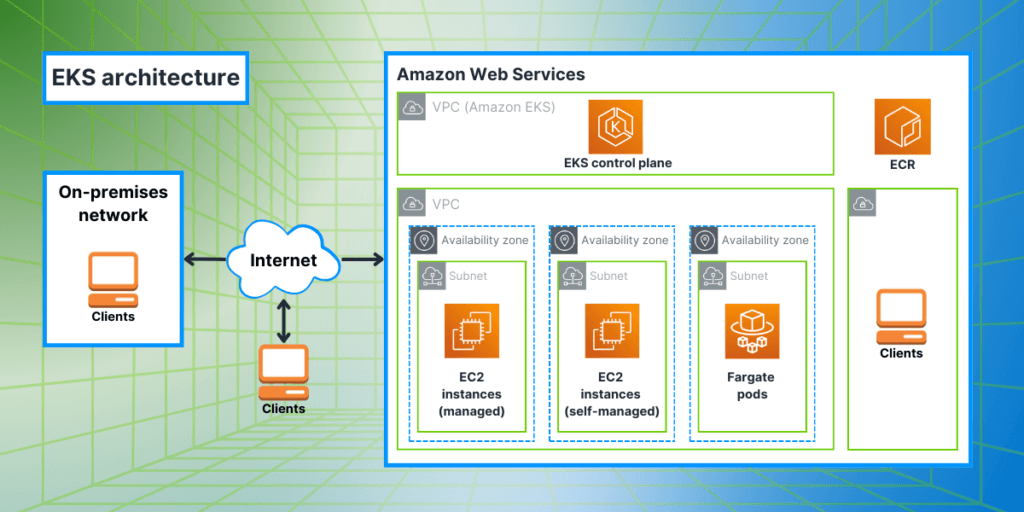
aws eks architecture

Overview of AWS ECS

ECS is a fully managed container orchestration service offered by Amazon Web Services. It allows users to easily run, manage, and scale Docker containers on a cluster of EC2 instances.

Key Features:

  • Easy to use: ECS simplifies the process of running containers by handling the deployment, scaling, and monitoring of containers for you.
  • Scalability: ECS allows you to easily scale your containerized applications up or down based on demand.
  • High availability: ECS automatically distributes containers across multiple Availability Zones to ensure high availability and fault tolerance.
  • Integration with other AWS services: ECS integrates with other AWS services such as Elastic Load Balancing, Auto Scaling, and IAM for a more comprehensive solution.
  • Cost-effective: With ECS, you only pay for the resources you use, making it a cost-effective option for running containers at scale.
  • Flexible deployment options: ECS supports both Fargate (serverless) and EC2 launch types, giving you the flexibility to choose the most suitable deployment option for your application.Benefits:
  • Simplifies container management: ECS automates the deployment, scaling, and management of containers, allowing developers to focus on building and deploying their applications rather than managing the underlying infrastructure.
  • Cost savings: With ECS, you only pay for the resources you use, helping you save costs on infrastructure management.
  • Scalability: ECS makes it easy to scale your containerized applications as your business needs grow.
  • High availability: ECS distributes containers across multiple Availability Zones, ensuring high availability and fault tolerance for your applications.
  • Seamless integration with AWS services: ECS integrates with other AWS services, allowing you to leverage the full capabilities of the AWS ecosystem.
  • Consistent performance: ECS ensures consistent performance for your applications by automatically managing the underlying infrastructure and resources.Use Cases:
  • Microservices: ECS is a great fit for deploying microservices-based applications as it allows for easy scaling and management of individual components.
  • Batch processing: ECS can be used for running batch processing workloads, such as data processing and analytics, in a cost-effective and scalable manner.
  • Web applications: ECS is well-suited for running web applications that require high availability and scalability, such as e-commerce sites or news websites.
  • Dev/Test environments: ECS can be used to quickly spin up development and testing environments, saving time and resources for developers.
  • Hybrid cloud: ECS can be integrated with on-premises infrastructure using AWS Outposts, allowing for a hybrid cloud deployment strategy.
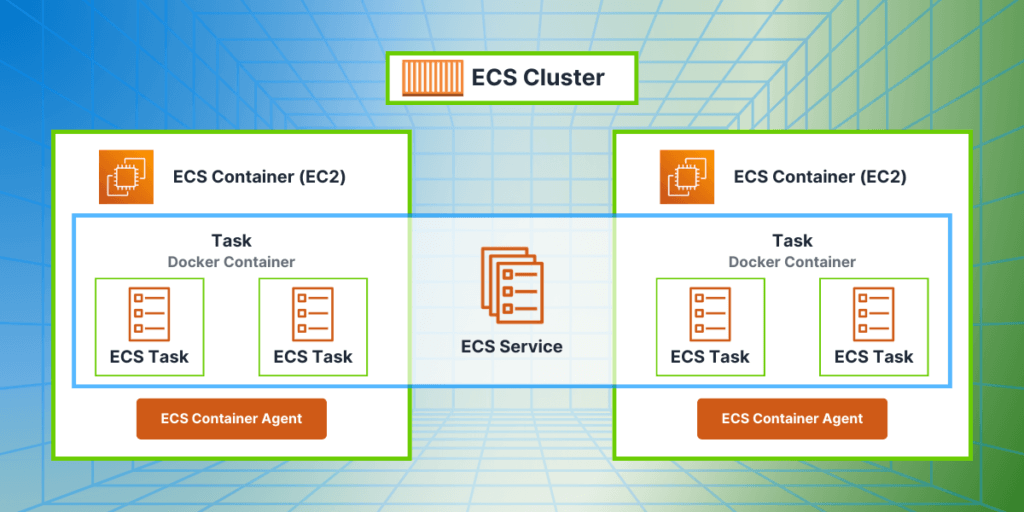
EKS vs. ECS: Key Differences

EKS and ECS allow users to run and manage containerized applications, but they have some key differences in their architecture, management overhead, scalability and flexibility, and integration with other AWS services and third-party tools.

Architecture:

EKS is built on top of Kubernetes, an open-source container orchestration platform. It uses Kubernetes API to manage clusters and runs applications in Docker containers. ECS, on the other hand, is a proprietary service developed by AWS and uses its own API to manage containers. It also supports both Docker containers and Amazon’s own container format, called Amazon Machine Image (AMI).

Management Overhead:

EKS has a higher management overhead compared to ECS. This is because EKS uses Kubernetes, which is a more complex platform and requires more manual configuration and management. EKS also requires users to manage and provision their own underlying infrastructure, such as EC2 instances. On the other hand, ECS is a fully managed service, so AWS takes care of the underlying infrastructure and automates many tasks, reducing the management overhead for users.

Scalability and Flexibility:

Both EKS and ECS are highly scalable and offer flexible deployment options. EKS allows users to scale their clusters up and down based on demand, and also supports horizontal and vertical scaling of containers. ECS also offers auto-scaling capabilities and can scale containers based on metrics such as CPU and memory usage. However, EKS offers more flexibility in terms of deployment options, as it supports both Linux and Windows containers, while ECS only supports Linux containers.

Integration and Compatibility:

Both EKS and ECS integrate well with other AWS services, such as Elastic Load Balancing, IAM, CloudWatch, and more. However, EKS has better compatibility with third-party tools and services, as it uses Kubernetes API, which is a popular and widely-used platform. ECS, being a proprietary service, has limited compatibility with third-party tools and services.

Security Features of EKS and ECS

AWS ECS and EKS offer a variety of security features to ensure the protection of your data and infrastructure.

In many ways, ECS and EKS are equally secure as parts of the AWS cloud platform. However, a significant difference lies in the security tools available. EKS provides access to Kubernetes’ native security features, offering admins and developers more security controls and tools compared to ECS. For instance, admins can utilize Kubernetes audit logs to detect and investigate security incidents, a capability absent in ECS. Both ECS and EKS securely store their Docker container images in ECR (Elastic Container Registry), and each time a container is launched, it retrieves its image securely from ECR.

Pricing Model of EKS vs ECS

The main difference in pricing between the services is that with EKS, you pay $0.10 per hour per running cluster, or $70 for a month of continuous operation. ECS does not have a cost per cluster. This can be significant if you need to run numerous clusters on Amazon.

EKS integrates with AWS Identity and Access Management to provide fine-grained control over who can access your Kubernetes clusters. On the other hand, ECS pricing is based on the resources consumed by your containers, making it a cost-effective option for smaller workloads. EKS pricing includes the cost of the underlying EC2 instances or AWS Fargate resources used to run your containers. EKS is based on the open-source Kubernetes platform, allowing you to leverage the power of Kubernetes without having to manage the underlying infrastructure. Whether you choose ECS or EKS will depend on your specific requirements and budget.

When and which service to choose?

When choosing between Amazon Elastic Kubernetes Service and Amazon Elastic Container Service for container orchestration on AWS, the decision hinges on several factors including management complexity, scalability, flexibility, integration capabilities, and pricing models.

EKS, leveraging Kubernetes, provides a robust and flexible platform suited for organizations that need advanced orchestration features and compatibility with third-party tools. It excels in environments where high customization, multi-cloud capabilities, and extensive automation are essential. However, it comes with a steeper learning curve and requires more hands-on management, potentially leading to higher operational overhead.

ECS, being a fully managed AWS service, offers simplicity and seamless integration with the broader AWS ecosystem. It is ideal for users who prioritize ease of use and quick deployment without the need for extensive infrastructure management. ECS is particularly beneficial for applications that do not require the extensive features of Kubernetes and for teams looking to minimize management overhead.

Both services ensure high performance, reliability, and security, with each having specific strengths. EKS’s flexibility and advanced orchestration features are balanced by ECS’s ease of use and tighter integration with AWS services.

Ultimately, the choice between EKS and ECS should be guided by your organization’s specific requirements, including the complexity of your applications, your team’s expertise, and your strategic goals for cloud deployment. By carefully evaluating these factors, you can select the service that best aligns with your operational needs and enhances your ability to manage and scale containerized applications effectively on AWS.

Understanding AWS EventBridge: A Comprehensive Guide

AWS EventBridge is a powerful event-driven service that allows developers to create highly scalable, event-driven architectures in the cloud. In recent years, event-driven architecture (EDA) has become increasingly popular in the world of cloud computing. This approach to building software systems is based on the concept of events – discrete occurrences that trigger actions or processes within an application.

In an event-driven architecture, different components of an application communicate through events, enabling a more loosely coupled and scalable system. This allows for a more flexible and resilient approach to building applications, as different components can react and respond to events in real-time.

AWS EventBridge is a fully managed event bus service that integrates with a wide range of AWS services and third-party applications. It simplifies the process of building event-driven architectures by providing a centralized event bus, event routing, and event filtering capabilities.

The purpose of this article is to provide a comprehensive understanding of AWS EventBridge. We will explore its key features, use cases, and benefits, as well as how it fits into the larger landscape of event-driven architecture in modern cloud computing. By the end of this article, readers will have a thorough understanding of how to leverage AWS EventBridge to build highly scalable and event-driven applications in the cloud. So, let’s dive in!

What is AWS EventBridge?

Amazon EventBridge is a serverless event bus service provided by Amazon. It allows developers to build event-driven architectures and integrate various AWS services, SaaS applications, and custom applications.

EventBridge is a serverless event bus that processes events from various event sources such as Amazon CloudWatch, Amazon SNS, AWS Lambda, API Gateway, and more. Developers can use EventBridge to route events to specific AWS services like Lambda functions, SQS, and Step Functions.

EventBridge provides a schema registry to define the structure of the event data and content-based event filtering to route events based on their content.

Event-driven Architecture Fundamentals

Event-driven architecture is a powerful design pattern that enables the creation of scalable, real-time data integrations using AWS services. At its core, the architecture revolves around the concept of events, which trigger actions in response to specific occurrences. To implement event-driven architecture using AWS, developers can leverage services such as EventBridge, which serves as a central hub for event ingestion and processing. EventBridge supports custom events, event patterns, and event integration with a variety of AWS applications and services. It is natively integrated with services like AWS Lambda functions, making it easier to build event-driven applications or services.

Additionally, EventBridge simplifies the process of integrating with external sources by providing a scalable event bus that enables seamless communication between different systems. The EventBridge schema registry stores the structure of incoming events, ensuring that data is properly interpreted and processed by downstream applications. By directly integrating with a variety of AWS services and with built-in event sources, EventBridge makes it easy to exchange data in real-time and connect with SAAS applications via event patterns.

aws eventbridge running

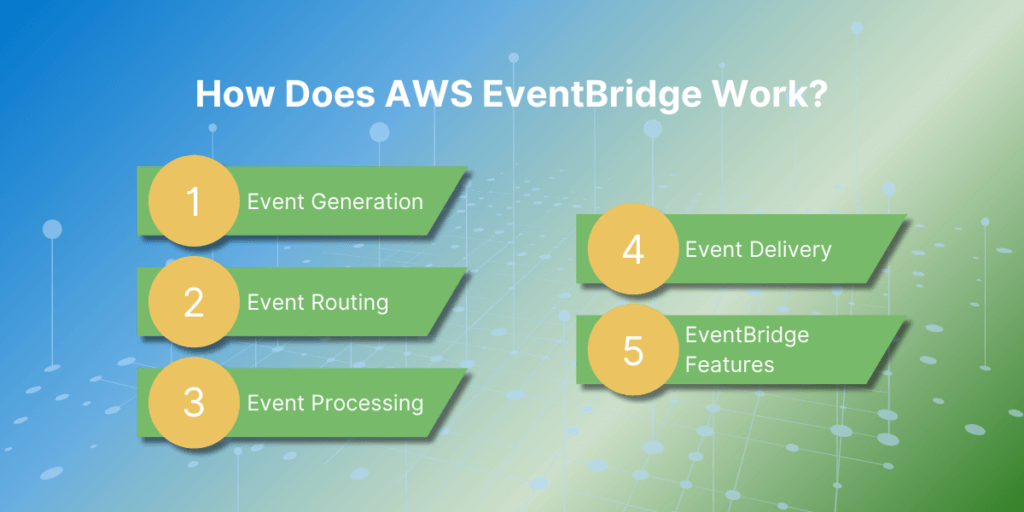
How Does AWS EventBridge Work?

Here is a step-by-step explanation of how AWS EventBridge works:

  1. Event Generation: The first step in the EventBridge process is event generation. Events can originate from different sources, such as AWS services, custom applications, or SaaS applications. These events can be triggered by a specific action, such as a new file being uploaded to an Amazon S3 bucket, or they can be scheduled events, such as a daily backup job.
  2. Event Routing: Once an event is generated, it is sent to the EventBridge service. EventBridge acts as a central hub for all events and routes them to their designated targets. This routing is based on rules that are set up by the user. These rules specify which events should be sent to which targets based on certain criteria, such as event type or source.
  3. Event Processing: After an event is routed to its target, it is processed according to the designated action. For example, if the target is an AWS Lambda function, the event will trigger the function to execute a specific code. If the target is an SQS queue, the event will be stored in the queue for later processing.
  4. Event Delivery: Once the event is processed, EventBridge delivers a response to the source of the event. This response can include information about the success or failure of the event processing, which helps to track the status of events and troubleshoot any issues.
  5. EventBridge Features: EventBridge offers several features to help manage events efficiently. These include event filtering, event transformation, and event replay. Event filtering allows users to specify which events should be routed to which targets, while event transformation allows users to modify the event data before it is sent to the target. Event replay allows users to replay past events in case of any failures or missed events.

Core Features of AWS EventBridge

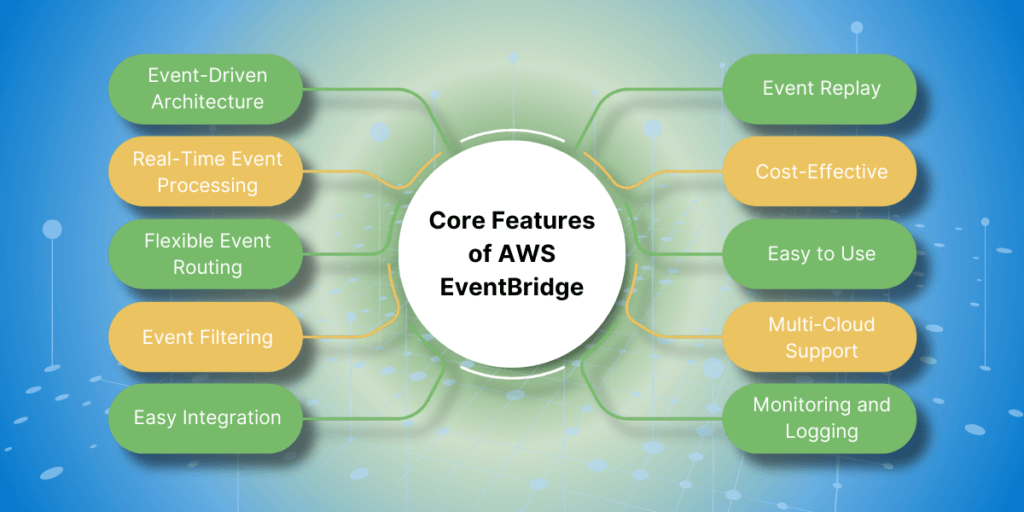
  1. Event-Driven Architecture: AWS EventBridge is designed to support event-driven architecture by allowing you to create event-based workflows and integrations. This means that actions are triggered by events, instead of being scheduled or manually initiated.
  2. Real-Time Event Processing: EventBridge can process events in real-time, allowing you to quickly respond to changes and updates in your environment. This makes it ideal for applications that require real-time data processing, such as streaming analytics and real-time monitoring.
  3. Flexible Event Routing: With EventBridge, you can easily route events to multiple targets, such as AWS Lambda functions, Amazon SNS topics, and Amazon SQS queues. This allows for greater flexibility and scalability in your event-based workflows.
  4. Event Filtering: EventBridge allows you to filter events based on specific criteria, such as event source, event content, and event time. This helps you to manage and process only the events that are relevant to your applications.
  5. Easy Integration: EventBridge integrates seamlessly with other AWS services, as well as third-party applications and services. This makes it easy to incorporate event-based workflows into your existing infrastructure.
  6. Event Replay: With EventBridge, you can replay events from the past 24 hours, making it easy to test and troubleshoot your event-based workflows. This can also be useful for recovering from errors or failures.
  7. Cost-Effective: EventBridge follows a pay-per-event pricing model, which means you only pay for the events that are processed by the service. This makes it a cost-effective solution for event-driven applications.
  8. Easy to Use: EventBridge is easy to set up and use, with a simple interface and intuitive features. This allows developers to quickly create event-based workflows without a steep learning curve.
  9. Monitoring and Logging: EventBridge provides detailed monitoring and logging capabilities, allowing you to track the performance of your event-based workflows and troubleshoot any issues that may arise.

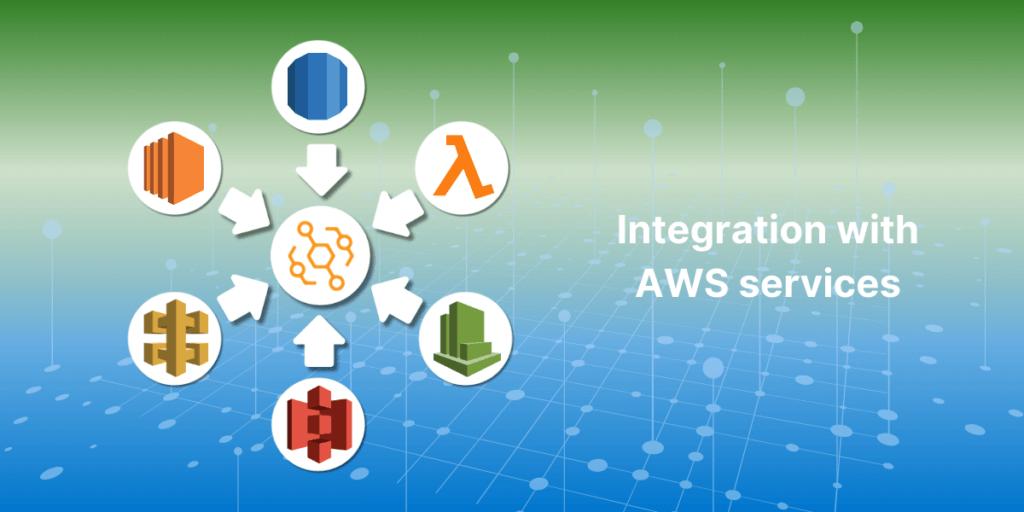
Integration with AWS services

Amazon Web Services (AWS) offers a wide range of cloud computing services that can be integrated with other applications and services. This allows for a more efficient and seamless flow of data between different systems, as well as providing access to powerful tools and features that can enhance the functionality of your application.

Some of the most popular AWS services that can be integrated with other applications include:

  1. Amazon S3 (Simple Storage Service): This service allows for secure and scalable storage of data in the cloud. It can be integrated with applications to store and retrieve data, such as user files, media, and backups.
  2. Amazon EC2 (Elastic Compute Cloud): This service provides virtual servers, known as instances, that can be used to run applications. It can be integrated with other services to provide a scalable and reliable infrastructure for your application.
  3. Amazon RDS (Relational Database Service): This service allows for the creation and management of relational databases in the cloud. It can be integrated with applications to store and retrieve data, such as user profiles, product information, and more.
  4. Amazon API Gateway: This service allows for the creation, management, and deployment of APIs. It can be integrated with applications to enable secure and efficient communication between different systems.
  5. Amazon Lambda: This service allows for the execution of code in response to events or triggers. It can be integrated with applications to automate tasks and processes, such as data processing or sending notifications.
  6. Amazon CloudWatch: This service provides monitoring and logging capabilities for your AWS resources. It can be integrated with applications to track and analyze performance metrics, as well as set up alerts and notifications.
  7. Amazon SES (Simple Email Service): This service allows for the sending and receiving of email messages. It can be integrated with applications to send transactional or marketing emails to customers.
  8. Amazon SNS (Simple Notification Service): This service allows for the sending and receiving of push notifications to mobile devices. It can be integrated with applications to send real-time updates and notifications to users.

Schema registry and discovery

Schema registry and discovery are two crucial components in the world of data management and integration. The schema registry serves as a centralized repository for storing and managing data schemas, ensuring consistency and compatibility across systems. On the other hand, discovery enables the automatic detection and sharing of data schemas, making it easier for applications to communicate with each other. Together, these two tools play a vital role in simplifying data integration and promoting data interoperability in complex environments.

Implementing AWS EventBridge

  • Create an EventBridge rule: To create an EventBridge rule, go to the AWS EventBridge console and click on the “Create rule” button. Give your rule a name and description, and then choose the event source. This can be an AWS service, a custom event bus, or an external event source. You can also choose to filter events based on specific criteria.
  • Configure targets: Next, you will need to configure the targets for your rule. These are the actions that will be performed when an event is received by the rule. You can choose from a variety of targets, such as Lambda functions, SNS topics, or Step Functions.
  • Set permissions: To allow your rule to send events to the chosen targets, you will need to set permissions. This can be done by creating a new IAM role or using an existing one.
  • Test your rule: Once your rule is created and configured, you can test it by sending test events to it. This will allow you to see if your rule is triggering the desired actions.
  • Monitor your rule: You can monitor the execution of your rule and the events it receives by going to the EventBridge console and viewing the rule’s dashboard. This will show you the number of events received, any errors, and the status of the targets.
  • Manage and update your rule: You can manage and update your rule as needed by going to the EventBridge console and selecting your rule. From here, you can edit the rule, add or remove targets, and change the event source or filtering criteria.
  • Automate with CloudFormation: To easily deploy and manage multiple EventBridge rules, you can use AWS CloudFormation. This allows you to define your rules in a template and easily deploy them to different environments.
  • Use EventBridge with other AWS services: EventBridge can be integrated with other AWS services, such as AWS Lambda, Amazon SNS, Amazon SQS, and more. This allows for more complex and automated event-driven workflows.

Best Practices for Using AWS EventBridge

  1. Design Considerations for Event-Driven Architectures – іdentify the events and triggers. Start by defining the events that your system needs to respond to and identify the triggers that will initiate those events. This will help in designing a clear and efficient event-driven architecture.Choose the right event source: AWS EventBridge supports various event sources such as AWS services, custom applications, and SaaS providers. Choose the event source that best fits your use case.Design for scalability and fault tolerance: As your system grows, the number of events and triggers will increase. Design your architecture to handle this growth and ensure that it is fault-tolerant to handle any failures.Use event schemas: EventBridge allows you to define event schemas that can be used to validate the incoming events. Use schemas to ensure that the events are in the expected format and avoid processing invalid events.Consider event delivery guarantees: EventBridge offers two delivery guarantees – at least once and exactly once. Choose the delivery guarantee based on the criticality of your events and the impact of duplicate events.
  2. Security and Permissions – use IAM roles and policies. EventBridge integrates with AWS Identity and Access Management (IAM) to control access to resources. Use IAM roles and policies to grant permissions to users and services that need to access EventBridge.Enable encryption: Enable server-side encryption for your event bus to ensure that your events are always encrypted at rest.Use AWS KMS: Use AWS Key Management Service (KMS) to manage the encryption keys used by EventBridge. This ensures that you have full control over the encryption keys and can manage them centrally.Use resource policies: EventBridge supports resource policies that allow you to control access to your event buses at a more granular level. Use resource policies to restrict access to specific event buses to specific IAM users or roles.
  3. Monitoring and Troubleshooting Tips – use CloudWatch Metrics. EventBridge automatically publishes metrics to CloudWatch, which can be used to monitor the health of your event buses and rule executions. Use these metrics to set up alarms and get notified of any issues.Enable CloudTrail: CloudTrail records API calls made to EventBridge, which can be useful for troubleshooting and auditing purposes. Enable CloudTrail and review the logs in case of any issues.Use CloudWatch Logs: EventBridge allows you to log events to CloudWatch Logs, which can help in troubleshooting and debugging your event-driven architecture. Use CloudWatch Logs to view the details of incoming events and troubleshoot any errors.Use Amazon EventBridge Console: The Amazon EventBridge console provides a visual representation of your event buses, rules, and targets. Use the console to monitor the flow of events and troubleshoot any issues with your event-driven architecture.

Comparing AWS EventBridge with Alternatives

There are a few alternatives to AWS EventBridge, and here we will compare it with some of the popular options:

  1. AWS Simple Queue Service (SQS): AWS SQS is a managed message queue service that allows decoupling of components in a distributed system. It is a reliable and highly available service that can handle large volumes of messages. Unlike EventBridge, SQS does not have built-in event routing and transformation capabilities. Users have to handle these functionalities themselves by using other AWS services like AWS Lambda or Amazon Simple Notification Service (SNS). This can require additional development effort and may not be suitable for complex event-driven architectures.
  2. Apache Kafka: Apache Kafka is an open-source distributed event streaming platform. It is highly scalable and can handle large volumes of events. Kafka provides features such as event routing and transformation through its Streams API. However, setting up and managing Kafka clusters can be complex and requires a significant amount of resources. It may not be suitable for smaller applications or those without dedicated DevOps resources.
  3. Google Cloud Pub/Sub: Google Cloud Pub/Sub is a fully managed event streaming service provided by Google Cloud Platform. It offers similar capabilities to AWS EventBridge, such as event routing and transformation. However, it is limited to Google Cloud services and does not have integrations with third-party applications. This can be a drawback for users who need to connect their custom applications or services from other cloud providers.
  4. Azure Event Grid: Azure Event Grid is a serverless event routing service offered by Microsoft Azure. Like AWS EventBridge, it supports event filtering, routing, and transformation. However, it is limited to Azure services and does not have integrations with third-party applications. It also has a lower event processing limit compared to AWS EventBridge. This can be a limitation for applications that require high event processing volumes.

Real-world Use Cases

  • Automated Workflows and Process Automation: AWS EventBridge can be used to create automated workflows and processes, helping organizations to streamline their operations and reduce manual work. For example, an e-commerce company can use EventBridge to trigger a series of events when a customer places an order, such as sending a confirmation email, updating inventory, and initiating the shipping process.
  • Serverless Architecture and Microservices: EventBridge is a key component in building serverless architectures and microservices on AWS. It allows different services and applications to communicate with each other through events, reducing the need for complex integrations and point-to-point connections. This enables organizations to build scalable and flexible systems that can handle large volumes of data and events.
  • Data Ingestion and Processing: EventBridge can be used for real-time data ingestion and processing, making it an ideal solution for streaming data from various sources. For example, a media company can use EventBridge to ingest and process user interaction data from their website, social media, and mobile apps in real-time, allowing them to make data-driven decisions and personalize user experiences.
  • Monitoring and Alerting: EventBridge can be used for monitoring and alerting in cloud environments. It can receive events from different AWS services, such as Amazon CloudWatch, and trigger actions or send alerts based on predefined rules. This allows organizations to proactively monitor their resources and respond to any issues or anomalies in real-time.
  • DevOps and CI/CD Pipelines: EventBridge can be integrated with DevOps tools and services to automate the deployment and management of applications. It can receive events from source code repositories, build and test systems, and deployment tools, triggering actions and updates as needed. This enables organizations to build efficient and reliable CI/CD pipelines for their software development processes.
  • Cloud Infrastructure Management: EventBridge can be used to manage and automate cloud infrastructure, such as launching and terminating instances, scaling resources, and managing backups. This helps organizations to optimize their cloud resources and reduce costs by automatically scaling up or down based on demand.
  • IoT Applications: EventBridge can be used for building event-driven IoT applications. It can receive events from IoT sensors and devices, triggering actions and updates in real-time. For example, a smart home system can use EventBridge to control and automate devices based on events, such as turning on lights when a person enters a room.
  • Data Analytics and Machine Learning: EventBridge can be integrated with AWS services for data analytics and machine learning, such as Amazon Kinesis and Amazon SageMaker. This allows organizations to capture and process events in real-time and use the data for training machine learning models and making data-driven decisions.
  • Chatbots and Voice Assistants: EventBridge can be used to build chatbots and voice assistants that can respond to user requests and trigger actions based on events. For example, a customer service chatbot can use EventBridge to access customer information and provide personalized responses based on events, such as a customer placing an order or requesting a refund.
  • Third-Party Integrations: EventBridge can be used to integrate with third-party services and applications, such as CRM systems, marketing automation tools, and payment gateways. This enables organizations to automate workflows and processes across different systems, improving efficiency and reducing manual work.

Summary

AWS EventBridge stands out as a versatile and robust service designed to facilitate the creation and management of event-driven architectures in the cloud. By providing a centralized event bus with seamless integration capabilities, it enables developers to connect various AWS services, third-party applications, and custom applications through events. This fosters the development of scalable, resilient, and real-time responsive systems.

EventBridge’s core features—such as flexible event routing, real-time event processing, and event filtering—make it an essential tool for building efficient and dynamic workflows. Its integration with AWS services like Lambda, S3, and CloudWatch further enhances its utility, simplifying complex event-driven processes. The service’s cost-effectiveness, ease of use, and support for multi-cloud environments ensure that organizations can leverage it without significant overhead.

Moreover, AWS EventBridge’s schema registry and discovery capabilities promote data consistency and interoperability, which are crucial for complex data integration tasks. The ability to automate processes, manage cloud infrastructure, and build serverless architectures underscores EventBridge’s role in modern cloud computing.

When comparing EventBridge to alternatives like AWS SQS, Apache Kafka, Google Cloud Pub/Sub, and Azure Event Grid, its seamless AWS ecosystem integration, coupled with extensive features for event routing and processing, offers a distinct advantage. This makes EventBridge particularly appealing for organizations already invested in AWS or seeking a fully managed event bus service.

In real-world scenarios, EventBridge proves invaluable across various domains, including automated workflows, data ingestion and processing, DevOps, IoT applications, and more. Its ability to trigger actions based on events enables businesses to streamline operations, enhance real-time data handling, and build responsive systems.

Overall, AWS EventBridge is a critical component for developers aiming to implement event-driven architectures in the cloud. Its comprehensive feature set, ease of integration, and support for diverse use cases make it a powerful tool for building scalable, flexible, and efficient cloud-native applications.

What are Amazon EBS Volumes?

Amazon EBS volumes (Elastic Block Store) is a high-performance, scalable block storage service from Amazon Web Services (AWS). It provides persistent storage volumes for Amazon EC2 instances, crucial for running applications and storing data in the cloud. EBS ensures low-latency, high-throughput data transfer for demanding applications.

Launched by AWS in 2008, EBS offers durable, reliable block-level storage for EC2 instances, addressing the need for persistent data storage in cloud environments. EBS has since added features like encryption, snapshots, and various volume types to meet different performance and cost needs.

EBS supports a wide range of use cases with high availability and durability through data replication within an Availability Zone. It offers multiple volume types, such as General Purpose SSD (gp2/gp3), Provisioned IOPS SSD (io1/io2), and Throughput Optimized HDD (st1), catering to different performance and budget requirements. EBS allows easy scaling of storage capacity and performance, with integrated backup solutions, encryption for data security, and seamless integration with other AWS services, making it essential for efficient and reliable cloud storage.

How Amazon EBS volumes work

Amazon EBS volumes offer high availability, durability, and the flexibility to scale, making them ideal for workloads that require stable and reliable storage. EBS volumes are designed to be highly available and reliable, with a wide range of performance options to suit different application needs.

To use an EBS volume, you first need to create it within the AWS Management Console. Once the EBS volume is created, it can be attached to any running EC2 instance. Here’s a step-by-step process on how EBS volumes can be attached to EC2 instances:

  1. Create an EBS Volume: Navigate to the “Volumes” section in the AWS Management Console, and click “Create Volume.” You can specify the type, size, and other settings based on your requirements.
  2. Attach the EBS Volume: After creating the EBS volume, select it and click on “Actions,” then choose “Attach Volume.” Select the relevant EC2 instance to which you want to attach the volume.
  3. Mount the Volume: Once the volume is attached, you need to mount it on the EC2 instance. Connect to the instance via SSH and use appropriate commands to format and mount the volume. For example, you can use lsblk to list block devices to mount the volume.

ebs multi attach

Attachments and Instances

EBS volumes are storage devices for Amazon EC2 instances, functioning as virtual hard drives with persistent block-level storage. Data on an EBS volume remains even after the EC2 instance is terminated.

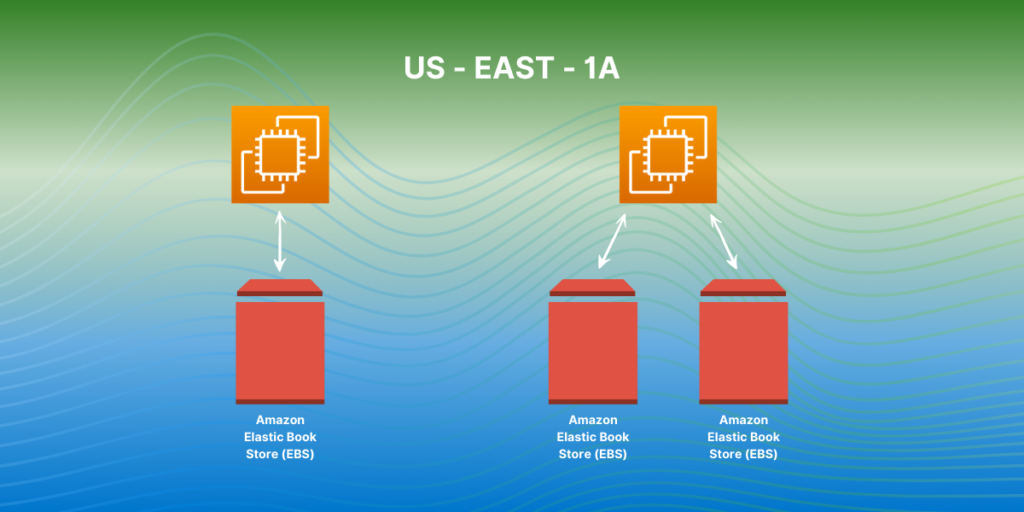
Created independently from EC2 instances, EBS volumes can be attached to any EC2 instance in the same Availability Zone and can be detached and reattached as needed.

When attached to an EC2 instance, EBS volumes appear as block devices, like physical hard drives. Multiple EBS volumes can be attached to a single instance, allowing for data management flexibility and improved performance by distributing I/O across volumes.

Amazon EBS volumes can be backed up using snapshots, point-in-time copies that can create new volumes or restore data if lost.

Storage Types

  • General Purpose SSD (gp2): Default EBS storage, balanced price and performance. Baseline 3 IOPS/GB, max 3,000 IOPS.
  • Provisioned IOPS SSD (io1): For high-performance databases and I/O-intensive applications. Customizable IOPS, up to 64,000 IOPS per volume.
  • Throughput Optimized HDD (st1): Ideal for frequently accessed, throughput-heavy workloads like big data and log processing. Low cost per GB, up to 500 MB/s throughput per volume.
  • Cold HDD (sc1): Best for infrequently accessed data, such as backups. Lowest cost per GB, with a max throughput of 250 MB/s per volume.

Features of Amazon EBS Volumes

Amazon EBS volumes offers the following features and benefits:

  • Multiple Volume Types: Choose from SSD-backed storage for transactional workloads and HDD-backed storage for throughput-intensive workloads to optimize performance and costs.
  • Scalability: Dynamically adjust volume capacity and performance without downtime using Elastic Volumes.
  • Backup and Recovery: Use EBS snapshots for data backup and quick restoration, as well as data transfer across AWS accounts, regions, or availability zones.
  • Data Protection: Encrypt volumes and snapshots to secure data-at-rest and data-in-transit.
  • Data Availability and Durability: io2 Block Express volumes provide 99.999% durability, with other volumes ensuring 99.8% to 99.9% durability. Data is replicated across multiple servers within an availability zone.
  • Data Archiving: EBS Snapshots Archive offers a cost-effective storage tier for archiving snapshots for 90 days or more.

Amazon EBS is a highly versatile and integral component of AWS that provides scalable, high-performance block storage for EC2 instances. EBS volumes function as virtual hard drives, ensuring persistent data storage even after instances are terminated. They can be easily created, attached, detached, and reattached across EC2 instances within the same Availability Zone, offering users flexibility and control over their storage solutions.

Amazon EBS supports various volume types tailored to different performance and cost needs, including General Purpose SSD (gp2), Provisioned IOPS SSD (io1), Throughput Optimized HDD (st1), and Cold HDD (sc1). Each type offers distinct characteristics suitable for a range of workloads, from high-performance databases to long-term data storage.

Overall, Amazon EBS volumes is an essential service for users requiring reliable, flexible, and high-performance storage solutions within the AWS ecosystem, supporting a wide range of applications and workloads with its robust set of features and capabilities.

How to start with Amazon EBS? 

Take the next step towards a more efficient and powerful cloud infrastructure. Contact us now to discover how CloudAvocado can transform your storage strategy with Amazon EBS. 

Updated pricing for Amazon EKS: Extended support explained

Earlier we talked about EKS at a high level in CloudAvocado article about EKS optimization. Here is real-life example: extended support for Amazon EKS. Among many other activities like monitoring cluster metrics, right-sizing nodes, and enabling autoscaling processes, surprisingly, Kubernetes version control is also important. Best practice: update Kubernetes on your EKS clusters to the latest available version once it’s released. Updates usually address security vulnerabilities, performance improvements etc., so it’s really important to check for a new versions once in a while. But not many of us did. However, that is has changed and now we need to pay more attention to it.

On April 1, 2024, Amazon announced general availability of extended support for versions of Kubernetes. It means from now on you can run your EKS clusters for up to 26 months from the date the version becomes available on EKS, instead of 14. Sounds good, however, this update produced a new pricing rule you need to know.

Standard EKS support

Kubernetes gets new features, design updates, and bug fixes with minor versions releases approximately once in four months. We already know that Amazon recommends creating new clusters using the latest version of Kubernetes and updating earlier created clusters to the latest version as well. The only thing you need to remember is that there are two support types now and the price of the cluster depends on it.

Each new Kubernetes version receives standard support for 14 months after being published on Amazon EKS.

Common billing rules are well known. You pay:

  • $0.10 per hour for each Amazon EKS cluster that you create
  • for services you use, as you use them (EKS on AWS using either EC2 you create to run your Kubernetes worker nodes or AWS Fargate)

What happens when it ends?

Amazon EKS

Extended EKS support

Immediately after the standard support term ends, Kubernetes version start receiving Extended support. It lasts for 12 more months. For example, standard support for version 1.23 in Amazon EKS ends on October 11, 2023. Extended support for version 1.23 began on October 12, 2023, and will end on October 11, 2024. It is available in all AWS regions. Exciting news – you don’t need to take any action to receive it – as soon as 14 months pass from the release date, clusters that still run it will be automatically onboarded to the extended support. 

New billing rules:

  • $0.60 (instead of $0.10) per hour for each Amazon EKS cluster that you create
  • for services you use, as you use them (EKS on AWS using either EC2 you create to run your Kubernetes worker nodes or AWS Fargate)

There are no limitations to Kubernetes in Amazon EKS extended support, so it won’t turn off or weaken your clusters’ capabilities. Clusters running Kubernetes versions released more than 26 months ago (14 months of standard support + 12 months of extended support) are upgraded to the oldest currently supported extended version automatically. It’s important to remember you still need to update cluster add-ons and Amazon EC2 nodes manually after the automatic control plane update, 

You can avoid auto-enrolling in extended support by upgrading your cluster to a Kubernetes version that’s still in standard support.

Standard vs extended EKS support: cost comparison

The price difference may not seem big at first sight. But let me prove that it’s worth your attention, especially if you use a lot of EKS. Simple calculations of monthly and full price differences between standard and extended support for one and more clusters: 

Clusters qty Standard support monthly cost

Extended support

monthly cost

Potential waste if not updated
1 month 12 month (full length)
1 730h * $0.1 = $73.0 730h * $0.6 = $438.0 $73.0 – $438.0 = – $365.0 – $4 380.0
10 $730.0 $4 380.0 – $3 650.0 – $43 800.0
30 $2 190.0 $13 140.0 – $10 950.0 – $131 400.0

As you can see, updating your clusters before they run into extended support can save you from spending an excessive $365 on each EKS cluster monthly! Real-life example: one of CloudAvocado’s users has 36 clusters, so in addition to monthly payment for included resources his extended support might have cost him 36 * $365.0 = $13 140.0 without any previous changes in the infrastructure. It’s good we were there to help.

You may assume it may be a big deal only for big organizations. However, I recommend setting up reminders regularly and updating Kubernetes versions before they run into extended support. Even if there are only a few clusters you can prevent unpredicted waste and keep your budget within limits.

Short FAQ

Will I get a notification when standard support is ending for Kubernetes version on my Amazon EKS? 

Yes, AmazonEKS sends a notification through the AWS Health Dashboard approximately 60 days before it ends

Are there any limitations to Kubernetes in extended support?

No, there are not.

Is AWS support available for clusters in extended support?

All clusters continue to have access to technical support from AWS.

Are there any limitations to patches for non-Kubernetes components in extended support?

Extended support will only provide support for AWS published Amazon EKS optimization AMIs for Amazon Linux, Bottlerocket, and Windows at all times. This means, you will potentially have newer components (such as OS or kernel) on your Amazon EKS optimized AMI while using Extended Support. 

Where can I update my Amazon EKS?  

Use this guide: Update existing cluster to new Kubernetes version

Does CloudAvocado help manage versions of EKS?

Yes, you’ll receive notifications about upcoming extended support while using the app and to your email to update them beforehand.

Follow my LinkedIn to learn more about interesting AWS updates that can help you avoid situations similar to those described above or book a Calendly meeting with me if you have questions about your AWS.