Benefits of AWS Well-Architected Framework Review and How It Can Help

Nowadays, cloud environment is the fastest evolving infrastructure for computing, data storage and application deployment, while it also ensures that your architecture is secure. So the AWS Well-Architected Framework has become an integral part of cloud computing best practices. This article explores the significance of this framework, highlighting the five foundational pillars and the benefits of conducting a Well-Architected Framework Review. We’ll explore how this process can optimize your cloud infrastructure, enhance security, and improve overall operational efficiency.

Overview of AWS Well-Architected Framework

The AWS Well-Architected Framework is a comprehensive set of guidelines and best practices developed by Amazon Web Services (AWS). It’s designed to help organizations build secure, high-performing, resilient, and efficient infrastructure for their applications. The framework is based on AWS’s extensive experience working with a diverse range of clients and offers a structured approach for customers and partners for assessing and improving their cloud architecture, ensuring alignment with AWS’s high standards.

At its core, the AWS Well-Architected Framework is built upon five key pillars:

  1. Operational Excellence: This pillar focuses on running and monitoring systems to deliver business value and continually improving processes and procedures.

  2. Security: Emphasizing the protection of information, systems, and assets, this pillar addresses risk assessment and mitigation strategies.

  3. Reliability: This aspect ensures that a system can recover from infrastructure or service disruptions, dynamically acquire computing resources to meet demand, and mitigate disruptions.

  4. Performance Efficiency: This pillar concentrates on using computing resources efficiently to meet system requirements and maintaining that efficiency as demand changes and technologies evolve.

  5. Cost Optimization: The final pillar addresses avoiding unnecessary costs by understanding and controlling where money is being spent, selecting appropriate resource types, analyzing spend over time, and scaling to meet business needs without overspending.

These pillars form the foundation of a robust and efficient cloud architecture, ensuring that cloud setups are not just functional, but optimized for specific organizational needs.

Benefits of AWS Well-Architected Framework Review

Having established the fundamental concepts, we will now proceed to examine the substantial advantages of implementing an AWS Well-Architected Framework Review. This section provides critical insights into the significant value this process can bring to your organization.

Enhanced Performance

One of the significant benefits of the AWS Well-Architected Framework Review is the identification of performance bottlenecks. By systematically assessing your architecture against best practices, the review highlights areas where performance can be improved. This process often uncovers inefficiencies in resource allocation, enabling your team to make informed decisions that enhance overall system efficiency.

Improved Security:

Security is a critical concern for any organization operating in the cloud. The AWS Well-Architected Framework helps with a thorough examination of your security posture, identifying vulnerabilities and gaps in your current setup. By following the security best practices outlined in the framework, you can ensure that your systems are fortified against threats and remain compliant with industry standards.

Cost Optimization

One of the most tangible benefits of a Well-Architected Framework Review is its potential for cost savings. The review process helps identify unused or underutilized resources, allowing for more efficient resource allocation. By optimizing your cloud spend, you can significantly reduce operational costs without compromising on performance or capabilities.

Operational Excellence

The review supports continuous improvement in operational processes. The AWS Well-Architected Framework Review helps streamline workflows, automate repetitive tasks, and implement best practices for monitoring and management. This leads to increased efficiency and reduced likelihood of human error in day-to-day operations.

Reliability

Building reliable systems that can quickly recover from failures is essential in today’s always-on digital environment. The Well-Architected Framework aids in designing resilient architectures that can withstand and rapidly recover from disruptions, ensuring high availability and business continuity. By adhering to the framework’s principles, you can build systems that not only meet current demands but also scale seamlessly to accommodate future growth.

The AWS Well-Architected Review Process:

Preparation

The review process begins with thorough preparation. This involves gathering all necessary documentation, such as architecture diagrams, workload details and security policies. Defining the scope of the review and identifying key stakeholders is crucial and also helps to clearly outline which workloads or applications should be assessed during the review. It is essential to ensure that all critical aspects of your architecture are covered.

Execution

During the execution phase, each workload is evaluated against the framework’s best practices. This involves a detailed analysis of your current architecture, identifying areas of alignment with AWS best practices and areas that require improvement.

Action Plan Development

Based on the review findings, an action plan is developed. This plan outlines specific steps to address identified issues and improve your cloud architecture. It typically includes both short-term quick wins and longer-term strategic improvements.

Implementation

The final step involves implementing the recommended changes and improvements. This may include adjusting security settings, optimizing resource allocation, or updating operational processes. Implementation should be approached systematically, prioritizing changes based on their potential impact and ease of implementation.

Best Practices for Conducting AWS Well-Architected Framework Reviews

To get the most out of your AWS Well-Architected Framework Review, keep these best practices in mind:

Regular Reviews

To maintain optimal performance and security, it’s important to conduct Well-Architected Framework Reviews on a regular basis. Annual reviews are recommended at a minimum, with more frequent reviews beneficial for rapidly evolving environments.

Stakeholder Involvement

Involving key stakeholders ensures a comprehensive evaluation and facilitates buy-in for proposed changes. This may include IT teams, finance departments, security specialists, and business leaders. Their input ensures that the review covers all relevant aspects of your architecture and helps secure buy-in for necessary changes.

Utilization of AWS Tools

AWS provides several tools to aid in the review process. The AWS Well-Architected Tool, for instance, is a free service that helps you review the state of your workloads and compare them to the latest AWS architectural best practices. Leveraging these tools can streamline the review process and provide valuable insights.

The AWS Well-Architected Framework Review is a powerful tool for organizations looking to optimize their cloud infrastructure. By focusing on the five pillars of operational excellence, security, reliability, performance efficiency, and cost optimization, this review process can lead to significant improvements in your cloud architecture.

Regular reviews, coupled with the involvement of key stakeholders and the use of AWS tools, can help ensure that your cloud infrastructure remains aligned with best practices and continues to meet your organization’s evolving needs. In the dynamic world of cloud computing, the AWS Well-Architected Framework Review is an essential process for maintaining a competitive edge and maximizing the benefits of your cloud investment.

Cloud Economics Explained: Basics, Advantages, and Use Cases

Cloud economics refers to the financial aspects of adopting and managing cloud computing resources. As organizations increasingly rely on cloud services, understanding cloud economics becomes crucial for making informed decisions about cloud investments. This concept involves analyzing the cost structures, benefits, and trade-offs associated with cloud computing, helping businesses optimize their expenditures while maximizing value. As cloud adoption grows across various industries, a deep understanding of cloud economics is essential for aligning cloud strategies with business goals and ensuring sustainable financial practices.

What is Cloud Economics?

Cloud economics encompasses the financial principles and strategies involved in adopting and managing cloud computing resources. It includes key components such as cost management, financial operations, and budgeting, all within the context of cloud computing. Understanding cloud economics is essential for businesses leveraging cloud services, as it allows them to optimize costs, allocate resources efficiently, and ensure that cloud investments align with their broader financial and operational goals. This knowledge is crucial for maximizing the return on investment (ROI) from cloud technologies.

Fundamentals of Cloud Economics

At the heart of cloud economics are principles like pay-as-you-go pricing, scalability, elasticity, and cost allocation. Unlike traditional IT infrastructure, where costs are largely fixed and upfront, cloud computing allows businesses to pay only for the resources they use. Scalability and elasticity further enhance cost efficiency, enabling organizations to adjust their resource usage dynamically based on demand. These fundamentals offer businesses unparalleled flexibility and financial control, transforming how IT budgets are managed and optimized in the cloud environment.

Benefits of Cloud Economics

Cloud economics offers numerous advantages, including significant cost savings, enhanced operational efficiency, and improved financial agility. By adopting a pay-as-you-go model, businesses can reduce capital expenditures and avoid overprovisioning resources. Cloud economics also enables better resource utilization, as companies can scale resources up or down based on demand. For example, a retailer can scale its cloud infrastructure during peak shopping seasons, ensuring optimal performance without incurring unnecessary costs. These benefits collectively contribute to a more flexible and responsive financial strategy.

Key Metrics in Cloud Economics

Key metrics in cloud economics, such as Total Cost of Ownership (TCO), Return on Investment (ROI), and Cost per User, play a critical role in managing and optimizing cloud expenses. TCO helps businesses assess the full cost of owning and operating cloud infrastructure, while ROI measures the financial returns on cloud investments. Cost per User provides insights into efficiency by evaluating how much is spent per active user. These metrics are essential for making informed financial decisions, ensuring that cloud investments are both cost-effective and aligned with business goals.

Use Cases of Cloud Economics

Understanding and applying cloud economics can drive significant business benefits across various scenarios. Startups, for instance, can optimize resources by using cloud services that scale with their growth, avoiding the heavy upfront costs of traditional IT infrastructure. Large enterprises managing complex, multi-cloud environments can leverage cloud economics to streamline operations and reduce costs. For example, a global corporation may use cloud economics principles to allocate costs across departments, ensuring financial accountability and efficient resource utilization. These use cases demonstrate the practical impact of cloud economics in diverse business contexts.

Challenges and Considerations

While cloud economics offers many benefits, businesses often face challenges such as cost overruns, complexity in managing costs, and the need for specialized skills. Cost overruns can occur when cloud usage is not carefully monitored or optimized, leading to unexpected expenses. The complexity of managing costs in a multi-cloud environment can also be daunting, requiring sophisticated tools and expertise. To overcome these challenges, businesses should invest in cost management tools, adopt FinOps practices, and ensure their teams are trained in cloud financial management.

Best Practices for Managing Cloud Economics

Effectively managing cloud economics requires strategic approaches, such as conducting regular cost audits to identify and eliminate waste. Utilizing cloud financial management tools can provide real-time insights into spending, helping businesses stay within budget. Collaboration between finance and IT departments is also crucial for aligning financial goals with cloud strategies. Establishing a culture of continuous monitoring and optimization ensures that cloud resources are used efficiently, ultimately leading to better financial outcomes.

Future Trends in Cloud Economics

As cloud computing continues to evolve, several emerging trends are shaping the future of cloud economics. One notable advancement is the integration of AI-driven cost optimization tools. These technologies leverage machine learning algorithms to analyze usage patterns and predict future costs, allowing organizations to proactively manage and reduce their cloud expenditures. By automating cost-saving strategies and providing actionable insights, AI-driven tools are becoming indispensable in the FinOps toolkit.

Another significant trend is the increased adoption of hybrid and multi-cloud strategies. Companies are moving away from single-cloud solutions in favor of leveraging multiple cloud providers to avoid vendor lock-in, enhance flexibility, and optimize performance. This approach also introduces complexities in managing costs across different environments, necessitating sophisticated cost management solutions and strategies to ensure that the benefits outweigh the potential challenges.

The evolution of cloud pricing models is also noteworthy. Providers are continuously refining their pricing structures to offer more granular and dynamic options. Innovations such as pay-as-you-go, reserved capacity, and spot instances provide businesses with a range of choices to align their cloud costs with their usage patterns. Understanding and effectively utilizing these pricing models is crucial for businesses aiming to maximize their cloud investments.

In summary, the future of cloud economics is characterized by rapid advancements in technology and evolving strategies. AI-driven cost optimization, hybrid and multi-cloud adoption, and innovative pricing models are setting the stage for a more dynamic and cost-effective cloud landscape. Understanding these trends is essential for businesses to navigate the complexities of cloud financial management effectively.

By staying informed about these developments and applying best practices, organizations can optimize their cloud investments, drive financial accountability, and achieve strategic goals. Embracing these trends and leveraging the insights provided will help businesses make informed decisions and harness the full potential of their cloud resources.

Optimizing Costs: How to Choose the Right AWS EC2 Instance Type

In today’s cloud-driven world, choosing right EC2 instance type is a cornerstone for many businesses seeking flexible computing power with autoscaling and rightsizing. An AWS instance type defines the virtual hardware that hosts your applications, encompassing various configurations of CPU, memory, storage, and networking capabilities. Choosing the right instance type is crucial not only for ensuring optimal performance but also for achieving cost efficiency. The myriad of EC2 instance sizes and the diversity in types of EC2 instances available can make this choice daunting. Understanding what an AWS instance is and how each EC2 instance family is tailored for specific workloads is key to making an informed decision. This article will guide you through the complexity of selecting the best AWS instance type for your needs, emphasizing how thoughtful choices can lead to significant savings in AWS instance type cost.

Understanding AWS EC2 Instance Types

AWS EC2 instances are categorized into several families, each designed to cater to specific workload requirements. The General Purpose family, including instances like the T and M series, offers a balanced mix of compute, memory, and networking resources. These are ideal for applications with diverse resource needs, such as web servers and small databases. The Compute Optimized family, featuring the C series, is engineered for tasks that require significant computational power, such as high performance web servers and scientific simulations.

ec2 types explained

For applications that demand large amounts of memory, the Memory Optimized family provides instances like the R and X series, which are perfect for in-memory databases and big data analytics. The Storage Optimized family, represented by instances like the I and D series, is tailored for workloads requiring high disk throughput and low latency, making them suitable for databases and distributed file systems. Lastly, the Accelerated Computing family, including P and Inf series instances, incorporates GPU capabilities to accelerate graphics-intensive applications and machine learning workloads. EC2 instances are designed to offer unique instance types, allowing businesses to select the configuration that best fits their specific needs, thus optimizing performance and cost.

Assessing Your Workload Requirements

When choosing the right AWS EC2 instance type, it’s essential to assess your workload’s specific needs. The key factors to consider include CPU, memory, storage, and network requirements. For instance, if your application involves high computational tasks, such as data processing or real-time analytics, a Compute Optimized instance like the C series would be a suitable choice. These instances provide high CPU performance and are designed to handle intensive workloads.

Similarly, if your workload requires significant memory capacity, such as running large databases or memory-intensive applications, Memory Optimized instances like the R or X series would be ideal. These instances offer a higher ratio of memory to CPU, ensuring efficient handling of memory-demanding tasks. For workloads that rely heavily on data storage and retrieval, such as database management systems or data warehousing, Storage Optimized instances like the I series provide the necessary disk performance and low latency.

In cases where your application benefits from parallel processing and accelerated performance, such as in machine learning or graphics rendering, the Accelerated Computing family, including the P series, offers powerful GPU capabilities. By carefully matching your workload characteristics with the appropriate EC2 instance family, you can ensure optimal performance and manage AWS instance type costs effectively.

Choosing the Right EC2 Instance Size

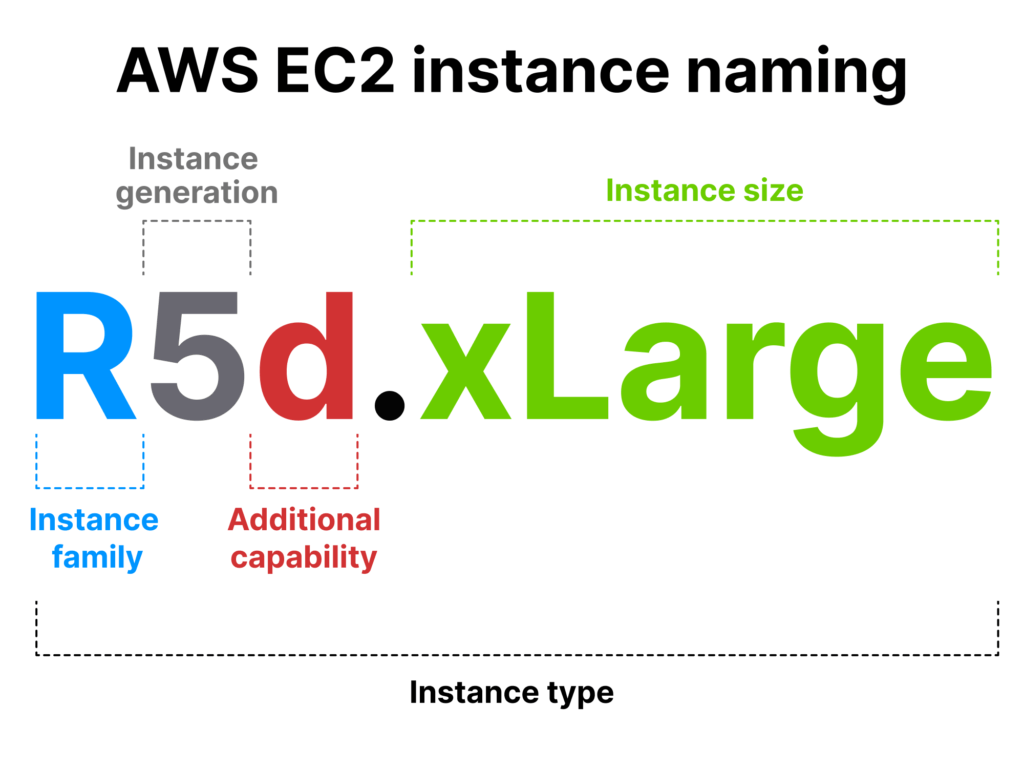
Once you’ve identified the appropriate instance family, the next step is selecting the right instance size. Each EC2 instance family offers a range of sizes, such as nano, micro, small, medium, large, xlarge, 2xlarge and up to 48xlarge.  Each provide varying combinations of CPU, memory, and storage, which doubles memory at each next size: e.g. t3.nano has 0.5 GB of memory, t3.micro – 1 GB, t3.small – 2 GB and so on. The key is to align your workload’s resource demands with an instance size that offers just the right amount of capacity and proper features — no more, no less.

For example, if you’re running a web server with moderate traffic, an m5.large instance might be sufficient. On the other hand, if you’re dealing with high-traffic applications or large-scale data processing, you might opt for an m5.2xlarge or larger instance. Right-sizing your instances ensures you’re not over-provisioning (which leads to wasted costs) or under-provisioning (which can cause performance bottlenecks).

Choosing the correct instance size allows you to optimize both performance and cost, ensuring your applications run smoothly without incurring unnecessary expenses. Regular monitoring and adjustments can help you maintain the right balance as your workload evolves.

Pricing Models and Options for chosen EC2 instance type

AWS offers several pricing models for EC2 instances, allowing users to tailor their cloud costs to their specific needs. The On-Demand pricing model provides the most flexibility, enabling users to pay for compute capacity by the hour or second without long-term commitments. This model is ideal for unpredictable workloads or short-term projects, as it allows for easy scaling up or down. However, it tends to be the most expensive option for long-term use.

Reserved Instances offer a significant discount compared to On-Demand pricing in exchange for a commitment to a specific instance type in a particular region for a one- or three-year term. This model is beneficial for stable workloads with predictable resource requirements, providing cost savings for long-term projects. On the downside, it lacks the flexibility to change instance types or regions without additional charges.

Spot Instances allow users to bid on unused EC2 capacity at potentially lower prices, making them a cost-effective option for flexible, fault-tolerant workloads. However, Spot Instances can be interrupted with little notice, so they are best suited for applications that can handle such interruptions, like batch processing or stateless web servers.

Lastly, Savings Plans provide a flexible pricing model offering lower prices on EC2 and other AWS services in exchange for a commitment to a consistent amount of usage over a one- or three-year term. Unlike Reserved Instances, Savings Plans are more flexible, allowing users to switch between instance families, sizes, and regions.

Choosing the best pricing model depends on your workload patterns and budget. For consistent, long-term workloads, Reserved Instances or Savings Plans can offer substantial savings. For short-term or unpredictable workloads, On-Demand instances provide the necessary flexibility. Spot Instances are perfect for cost-conscious users with workloads that can tolerate interruptions. Balancing these options based on your specific requirements will help you optimize costs while maintaining the performance and reliability of your applications.

Tools and Techniques for Cost Optimization

AWS provides a suite of tools designed to help users manage and optimize their cloud costs effectively. One of the key tools is AWS Cost Explorer, which offers a detailed view of your AWS spending. It enables users to analyze costs and usage patterns over time, identify trends, and forecast future expenses. With its customizable reports, you can drill down into specific services or cost categories, helping you understand where your money is going and identify opportunities for savings.

Another valuable tool is AWS Trusted Advisor, which provides real-time guidance to help you optimize your AWS environment. It offers recommendations across several categories, including cost optimization, security, and performance. For cost management, Trusted Advisor can suggest rightsizing instances, deleting unused resources, and taking advantage of more cost-effective pricing models like Reserved Instances or Savings Plans.

AWS Compute Optimizer is specifically focused on analyzing your Amazon EC2 instances and recommending the optimal instance types based on your actual usage. It assesses various factors, such as CPU, memory, and network utilization, to suggest downsizing, upgrading, or switching to a different instance family. This tool can help ensure that you are not over-provisioning resources, thereby reducing unnecessary costs.

To maximize the benefits of these tools, it’s crucial to regularly monitor your AWS environment and adjust instance usage as needed. Set up alerts for cost anomalies, review usage reports frequently, and take action on optimization recommendations. By staying proactive and leveraging these AWS tools, you can maintain an efficient, cost-effective cloud infrastructure that aligns with your business needs.

Best Practices for Cost Optimization

Achieving cost efficiency in AWS requires a strategic approach to managing resources. One fundamental strategy is right-sizing instances, which involves selecting the optimal instance size that meets your workload’s requirements without over-provisioning. By analyzing your applications’ performance metrics, such as CPU and memory utilization, you can identify underutilized instances and downsize them to more cost-effective options. This not only reduces costs but also ensures resources are used efficiently.

Implementing auto-scaling is another key practice that helps match resource allocation with demand. AWS Auto Scaling automatically adjusts the number of instances in response to real-time changes in workload, scaling out during peak times and scaling in during periods of low demand. This dynamic adjustment ensures that you only pay for the resources you need, optimizing costs while maintaining performance.

For workloads that can tolerate interruptions, leveraging spot instances is an excellent way to reduce expenses. Spot instances allow you to bid on spare AWS capacity at a lower cost, making them ideal for non-critical tasks like batch processing or data analysis. By using spot instances in conjunction with other instance types, you can balance cost savings with availability and reliability.

Finally, it’s crucial to regularly review and adjust Reserved Instances and Savings Plans. As your business needs evolve, so do your AWS usage patterns. Periodically assess your reserved capacity commitments to ensure they still align with your current and future requirements. If necessary, modify or exchange Reserved Instances and Savings Plans to better match your usage, thereby maximizing your savings.

By implementing these best practices, you can optimize your AWS costs effectively, ensuring that your cloud spending aligns with your budget and business goals.

In the ever-evolving landscape of cloud computing, selecting the right EC2 instance types is crucial for optimizing costs and ensuring efficient resource utilization. The variety of AWS instance types and pricing models offers businesses the flexibility to tailor their infrastructure to specific workload needs, balancing performance and cost. By understanding the characteristics and use cases of different EC2 instance families, you can make informed decisions that align with your operational requirements and financial goals.

However, cost optimization is not a one-time task. It requires continuous monitoring and adjustment to adapt to changing workloads and business needs. Regularly reviewing your instance usage, leveraging AWS cost management tools, and adjusting your strategies, such as right-sizing instances or utilizing spot instances, are essential practices for maintaining cost efficiency. By staying proactive and attentive to your AWS environment, you can maximize the value of your cloud investment and support the sustainable growth of your business.

Comprehensive Guide: AWS Savings Plan vs Reserved Instances

As businesses increasingly rely on Amazon Web Services for their cloud computing needs, effective cost management becomes crucial. AWS offers multiple ways to optimize costs, and we have discussed (described, defined, compared) two of them in our previous post: Spot and Reserved Instances. However, there are more options to reduce the cost you spend on your cloud. In this article we will see through the topic of Savings Plans vs Reserved Instances (RIs). This guide provides an in-depth comparison between these two cost-saving strategies, detailing their mechanisms, benefits, and suitability for various workloads. By the end of it, you will be equipped with the knowledge to make a decision on which strategy best aligns with your business needs.

Managing costs in AWS is critical due to the extensive range of services and resources available. Without proper monitoring and optimization, cloud cost can quickly escalate, impacting the bottom line. Implementing an effective cost-saving strategy, such as AWS Savings Plans or Reserved Instances, ensures that businesses can maintain financial control while benefiting from AWS’s powerful offerings.

AWS Savings Plans: Increased Flexibility and Savings

AWS Savings Plans are a cost-effective solution for businesses looking to optimize their cloud spending. These plans provide significant discounts in exchange for a commitment to a consistent amount of AWS usage (measured in $/hour) over a one or three-year term. There are three types of savings plans: Compute Savings Plans, EC2 Instance Savings Plans, and Custom Savings Plans.

1. Compute Savings Plans

Compute Savings Plans are often the most flexible among all AWS Savings Plans. They provide savings of up to 66% on AWS compute usage, covering various services including AWS Lambda, and AWS Fargate. Also, Compute Savings Plan applies to any ECS2 instance, regardless of instance family, AWS region, operating system, or tenancy.

Key Features:

  • Flexibility: Compute Savings Plans allow you to switch between different instance types, regions, operating systems, and tenancies without losing your discount. This is ideal for businesses with dynamic workloads that need to scale resources frequently or migrate applications across different regions.
  • Broad Coverage: The plan’s broad applicability across multiple compute services makes it easier to manage and optimize AWS costs.
  • Ease of Management: With a single commitment, you can enjoy discounts across various AWS services, simplifying cloud cost management.

Ideal For:

  • Organizations with variable and evolving workloads.
  • Businesses looking to modernize their applications with serverless computing or containerized workloads.
  • Companies that require the ability to migrate workloads across different regions and instance types.

2. EC2 Instance Savings Plans

EC2 Instance Savings Plans provide targeted discounts of up to 72% on Amazon EC2 instances within a specific instance family in a chosen region. These plans are slightly less flexible but offer higher discounts compared to Compute Savings Plans.

Key Features:

  • Instance Family Specific: Discounts apply to usage within a specific instance family (e.g., M5, C5) in a particular region. This is suitable for businesses with predictable and steady workloads running on specific instance types.
  • Higher Savings: These plans offer greater discounts due to their more focused nature.
  • Region Specific: EC2 Savings Plans are tied to a specific AWS region, meaning changes to instance types within the same family are allowed, but cross-region usage is not covered.

Ideal For:

  • Organizations with predictable workloads on specific EC2 instance families.
  • Businesses that do not frequently change instance types or regions.
  • Enterprises looking to maximize savings on steady-state applications.

Also, there are Custom Savings Plans, like Amazon SageMaker Savings Plan, which is a tailored solution negotiated with AWS for large-scale customers with unique requirements. These plans offer the most optimized savings based on the customer’s specific usage patterns. These savings plans are applied automatically to your SageMaker instance, no matter what instance family, size, region, or component you use.

Given these points, Savings Plans provide costs reduction by allowing a commitment to a consistent amount of usage over a term. This commitment yields discounts on the usage, regardless of the amount used within the committed level. The flexibility of Compute Savings Plans permits changing instance types or using different AWS services while maintaining cost benefits. EC2 Instance Savings Plans offer savings within a specified instance family and region, suitable for predictable workloads.

savings plan img

AWS Reserved Instances: Maximum Savings for Predictable Workloads

Reserved Instances, as I mentioned before, were the topic, we discussed in our previous article and in case you are in crossroads for the most suitable discount, check out Spot Instances vs Reserved Instances.

Reserved Instances offer significant discounts (up to 75%) over on-demand pricing in exchange for committing to a specific instance type in a particular region for a one or three-year term. There are three types of EC2 Reserved Instances: Standard Reserved Instances, Convertible Reserved Instances, and Scheduled Reserved Instances.

Standard Reserved Instances: These RIs offer the highest discount but the least flexibility. You commit to a specific instance type and can modify attributes like the Availability Zone and instance size within the same family.

Convertible Reserved Instances: These RIs provide lower discounts compared to Standard RIs but allow you to change instance types, operating systems, and tenancy, as long as the new configuration is of equal or greater value.

Scheduled Reserved Instances: These RIs are designed for workloads that need to run at specific times, providing a discount for reserving capacity on a predictable schedule.

Key Benefits of AWS Reserved Instances:

  1. Highest Discounts: Standard RIs offer the largest cost savings for predictable, steady-state workloads.
  2. Customization: Convertible RIs allow for changes in instance types and other attributes, offering a balance between cost savings and flexibility.
  3. Scheduled Usage: Scheduled RIs are perfect for workloads with predictable, time-based usage patterns.

RI illustration

Explore the Differences Between AWS Savings Plans and Reserved Instances

When talking about difference between AWS Savings Plans and Reserved Instances, Compute Savings Plans outperform Reserved Instances in terms of flexibility, as they are applicable across several services and regions. EC2 Instance Savings Plans, while less flexible, are nevertheless useful for predictable workloads. SageMaker Savings Plans automatically apply discounts for organizations focused on machine learning with SageMaker. Standard RIs provide less flexibility but bigger discounts, whereas convertible RIs provide greater flexibility but slightly lower discounts.

Savings Plans usually provide a 66% savings over On-Demand pricing, however Compute Savings Plans offer more flexibility. Reserved Instances offer savings of up to 72 % with Standard RIs and around 54% with Convertible RIs, making them extremely cost-effective for specified workloads.

Savings Plans necessitate a commitment to a consistent hourly usage (USD/hour) over one or three years. Reserved Instances, on the other hand, demand a one- or three-year commitment to specified instance types and geographies, with the option of paying beforehand to maximize discounts. Savings Plans are best suited for dynamic and changeable workloads that demand flexibility, whereas Reserved Instances are excellent for steady-state, predictable workloads with instance type requirements.

Pros and Cons of Each Option

AWS Savings Plans are ideal for organizations needing flexibility and broad service coverage, especially for variable or evolving workloads. However, they require a commitment to a consistent usage amount and can be complex to manage. On the other hand, Reserved Instances provide the highest savings for predictable, steady-state workloads and offer options like Convertible and Scheduled RIs for some flexibility. They require specific instance type commitments and are mainly suitable for EC2 instances, making them less flexible than Savings Plans. By weighing these pros and cons, businesses can choose the best option to optimize their AWS costs based on their unique needs and workload patterns.

Practical Examples and Use Cases

When deciding between wide range of AWS discounts, it’s essential to align your choice with your business needs and usage patterns. For startups and organizations with fluctuating workloads, Compute Savings Plans provide the flexibility needed across various compute services, making them an excellent option. Conversely, large enterprises running steady-state applications can maximize savings with Standard Reserved Instances (RIs), especially if the instance type and region are fixed. These businesses benefit from the substantial discounts provided by Standard RIs.

Modern applications, particularly those leveraging serverless architectures like AWS Lambda, find significant advantages with Compute Savings Plans due to their broad applicability. This makes Compute Savings Plans offer multiple solutions, that are perfect for organizations working in modern, scalable, and efficient serverless environment.

Tools and Resources

AWS provides several tools and resources to assist in the decision-making process. AWS Cost Explorer is a powerful tool that helps visualize and analyze your historical usage and costs, enabling you to identify patterns and predict future needs. AWS Trusted Advisor offers real-time guidance to help you provision your resources according to best practices, optimizing performance, security, and cost efficiency. Utilizing these tools can simplify the assessment process, ensuring you choose the most cost-effective plan aligned with your business objectives.

By carefully evaluating your requirements and utilizing AWS’s comprehensive tools, you can select the right cost-saving strategy – whether an EC2 Instance Savings Plan or Reserved Instance – to optimize your cloud expenditures and drive business growth.

In summary, choosing between AWS Savings Plans and Reserved Instances depends on your business’s needs and usage patterns. AWS Savings Plans offer flexibility and broad applicability, ideal for dynamic workloads. In contrast, Reserved Instances provide significant savings for predictable, steady-state workloads. Leveraging AWS tools like Cost Explorer and Trusted Advisor can help make informed decisions, ensuring you maximize savings while maintaining necessary flexibility and performance. Understanding these differences will empower your business to optimize cloud expenditures effectively and support growth and efficiency in your cloud strategy.

By carefully assessing your business needs, workload patterns, and financial commitments, you can make an informed decision that optimizes your AWS cost management strategy. Taking proactive steps now will ensure that you maximize your investment in AWS while maintaining financial control and operational efficiency.